

CAMWorks and 3DEXPERIENCE SOLIDWORKS: Seamless Manufacturing Integration for Smarter CNC Programming
How CAMWorks and 3DEXPERIENCE SOLIDWORKS Are Transforming Manufacturing Workflows
Manufacturers today are looking for ways to streamline operations, improve collaboration, and reduce the complexity of managing design-to-manufacturing processes.
HCL CAMWorks provides a seamless integration into the 3DEXPERIENCE SOLIDWORKS platform, allowing users to program parts, manage machining data, and collaborate across teams within a connected environment. Whether you're working with legacy CAMWorks data or creating new CNC programs, the experience is designed to be intuitive, efficient, and familiar.
In this blog, we'll explore how CAMWorks users can take advantage of the 3DEXPERIENCE platform while maintaining the workflows and machining intelligence they already rely on.
Seamlessly Transition Existing CAMWorks Data to 3DEXPERIENCE
One of the biggest challenges when adopting a new platform is ensuring that years of programming knowledge and manufacturing data remain accessible.
With CAMWorks and 3DEXPERIENCE SOLIDWORKS, users can continue leveraging their existing processes without disruption.
Working with Legacy CAMWorks Data
For those with an extensive library of CAMWorks data, integration with 3DEXPERIENCE offers a smooth path forward. Users can:
- Open files in the desktop version of SOLIDWORKS.
- Use the 3DEXPERIENCE connector to access and program parts stored locally or on a network.
- Upload programmed parts directly into the 3DEXPERIENCE platform, enabling better collaboration and centralized storage.
- Retain and adapt existing settings, machines, and strategies — ensuring that moving to the platform doesn't disrupt established workflows.
Rather than rebuilding programming environments from scratch, users can transition confidently while preserving the investments they've already made in CAMWorks.
Programming Directly Within 3DEXPERIENCE SOLIDWORKS
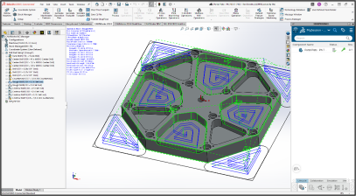
One of the standout advantages of this integration is the ability to perform CAM programming directly inside 3DEXPERIENCE SOLIDWORKS while maintaining the familiar CAMWorks workflow.
For existing users, the experience feels immediately recognizable. The same powerful programming tools are available, now enhanced by the collaborative capabilities of the platform.
- Machine Selection: Choose machines from your technology database, like a Haas VF3 or Doosan 3-axis.
- Automated Feature Recognition (AFR): Extract machinable features and generate operation plans.
- Toolpath Creation: Generate and refine toolpaths, apply sorting, and combine operations.
- Simulation and Verification: Run simulations to ensure accuracy and compare results, ensuring high-quality outputs.
- Post-Processing: Generate G-code directly within 3DEXPERIENCE SOLIDWORKS for precise machine operation.
Advanced CNC Validation with CAMWorks Virtual Machine
As manufacturing becomes more complex, validating machining processes before production is more important than ever. That's where CAMWorks Virtual Machine Technology provides significant value.
What Is CAMWorks Virtual Machine?
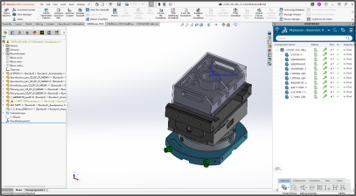
Virtual Machine creates a realistic digital representation of the machine environment, enabling users to validate machining operations before parts ever reach the shop floor — and it is directly accessible from 3DEXPERIENCE SOLIDWORKS.
Benefits of Virtual Machine Technology
- Real-time machine simulation, including 3+2 indexing setups.
- Verification of toolpaths and G-code within a virtual environment.
- Confidence in machining accuracy before physical production.
By testing programs in a virtual environment, manufacturers can reduce risk, improve efficiency, and minimize costly downtime.
For additional information about HCL CAMWorks and its integration with 3DEXPERIENCE SOLIDWORKS:
